
User Tag List
Results 1 to 7 of 7
 7Likes
Thread: How to take a screenshot
-
Tue, Apr 3rd, 2012, 08:02 AM #1Trade Mod



- Join Date
- Jan 2009
- Location
- West of the Tdot
- Posts
- 36,219
- Likes Received
- 21144
- Trading Score
- 173 (100%)


2
With the issues people are having with SC, I thought I would add this so people can show Boo how things appear on their screen.
In addition, you should tell him which browser you are using, to find the version, click Help > About in your browser
To take a screenshot, you may have software installed on your computer, check for snipping tool in newer versions of windows or:
Find the PrtScr button on your computer, its usually just right of F12
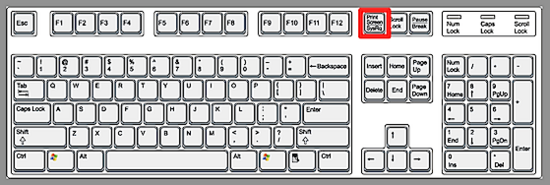
You may have to press Control or Fn with it to copy the page, it will save it like you have copied something from the internet.
Open Paint or anything like it and click Paste (or Control+V) and the picture will paste into the page
Save like any other image and click insert image in the post box
 This thread is currently associated with: Microsoft
-
-
Thu, Apr 5th, 2012, 12:30 AM #2I love to Trade


- Join Date
- Jan 2008
- Location
- Thornhill (GTA) Ontario
- Posts
- 9,600
- Likes Received
- 1993
- Trading Score
- 565 (100%)
thanks I did not know about the snipping tool! Originally Posted by FallenPixels

Open a Tangerine (ING DIRECT) Account with $100 & use my Orange Key 22115175S1 we will both get $50.00
-
Fri, Apr 6th, 2012, 07:40 PM #3Kings County Coupon Queen

- Join Date
- Mar 2009
- Location
- New Brunswick
- Posts
- 9,069
- Likes Received
- 93
- Trading Score
- 693 (100%)
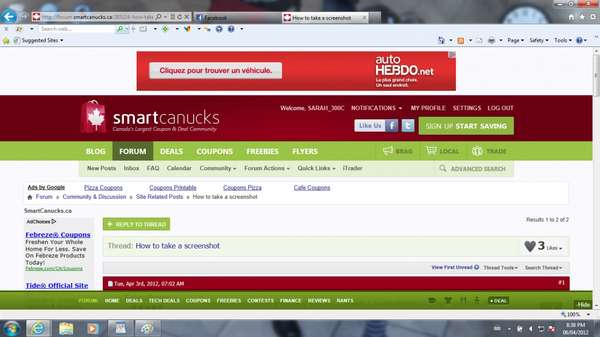
Yay, it worked!
-
Mon, Apr 30th, 2012, 10:19 AM #4Trade Mod
- Join Date
- Jan 2009
- Location
- West of the Tdot
- Posts
- 36,219
- Likes Received
- 21144
- Trading Score
- 173 (100%)
-
Fri, May 4th, 2012, 09:02 AM #5Canadian Guru


- Join Date
- Jul 2009
- Location
- Where love grows
- Posts
- 15,848
- Likes Received
- 20464
- Trading Score
- 109 (100%)

Thanks, I've been wondering how to do that. I appreciate you taking the time to teach us. Some of us...
 well me, are computer illiterate
We all need a little sunshine every now and then
well me, are computer illiterate
We all need a little sunshine every now and then
-
Mon, May 7th, 2012, 02:39 AM #6
Thanks,but why i can't find the Fn?
-
Mon, May 7th, 2012, 08:40 AM #7Trade Mod
- Join Date
- Jan 2009
- Location
- West of the Tdot
- Posts
- 36,219
- Likes Received
- 21144
- Trading Score
- 173 (100%)
Fn is beside the left control button usually, but for most computers, you don't need it anymore as it will just have the two settings on the key
 Send PM


Thread Information
Users Browsing this Thread
There are currently 1 users browsing this thread. (0 members and 1 guests)
