
User Tag List
Results 2,176 to 2,190 of 19794
 161Likes
Thread: The person above me
-
Thu, Aug 21st, 2008, 05:44 PM #2176
:D
TPA is very encouraging!!
Though I need to get an avatar...The little bit about me to the left of each of my posts looks so very plain and newbie-ish. Especially because, right under my name, it declares, "CaNewbie"!! haha
-
-
Thu, Aug 21st, 2008, 05:47 PM #2177Smart Canuck



- Join Date
- Apr 2008
- Location
- CFB Borden
- Age
- 51
- Posts
- 2,872
- Likes Received
- 1
- Trading Score
- 0 (0%)


-
Thu, Aug 21st, 2008, 05:48 PM #2178
TPA knows how to state the obvious!! >=P
-
Thu, Aug 21st, 2008, 05:49 PM #2179Canadian Guru


- Join Date
- Jul 2007
- Location
- Beautiful BC
- Posts
- 14,147
- Likes Received
- 11
- Trading Score
- 0 (0%)


You can change all of that to whatever you wish...
Those are just default titles like the Guru is on mine

-
Thu, Aug 21st, 2008, 05:50 PM #2180
TPA has told me something I do not know!
I'll change all of it when I have less of a headache I think...
-
Thu, Aug 21st, 2008, 05:52 PM #2181Smart Canuck
- Join Date
- Apr 2008
- Location
- CFB Borden
- Age
- 51
- Posts
- 2,872
- Likes Received
- 1
- Trading Score
- 0 (0%)
-
Thu, Aug 21st, 2008, 05:52 PM #2182Canadian Guru
- Join Date
- Jul 2007
- Location
- Beautiful BC
- Posts
- 14,147
- Likes Received
- 11
- Trading Score
- 0 (0%)
Here is the link
http://forum.smartcanucks.ca/showthread.php?t=37289
It is in the Site related Post section
and here is some info on it
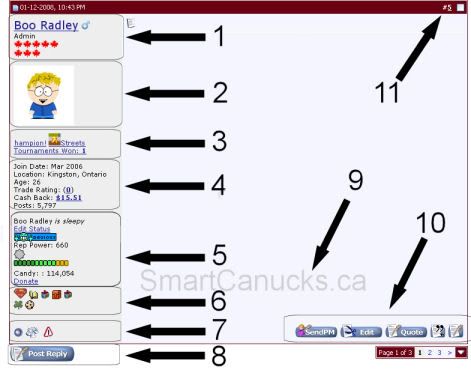
 Icons explained
~~~~~~~~~~~~~~~~~~~~~~~~~~~~~~~~~~~~~~~~~~~~~~~~~~ ~~~~~~~~~~~~
1.
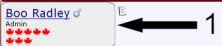
User Name
Custom User Title - Can change using this link.
Maple Leafs - The number of maple leafs change based on how many posts you have. Read more here.
2.
User Avatar
- You can add or upload an avatar by going to User CP - Edit Avatar
3.

Arcade Info
- displays any arcade games you have the high score in, and the number of tournaments won.
- you can access the arcade here.
- you can read more info on the arcade in this thread.
4.
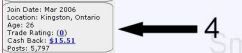
Join Date
Location - can be left blank. If you want to edit this option, go to User CP - Edit Profile
Age: If you've entered in your birth date.
Trade Rating: Feedback received from coupon trades. Read more here.
Cash Back: Cash back earned from shopping Smart Canucks Cash back. Read more here.
Posts: How many posts you have made on the forum
5.
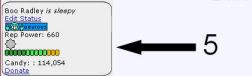
Status: You can click the "edit status" button to change your status
Mood: A way to show what kind of mood you are in - if no mood selected this will be blank
- the list of moods is found underneath your private message box.
Reputation Power: Reputation received from other members, the more bars/sun's you have the higher your reputation rating. Read more here.
Candies: You get candy by creating a thread (4 candies), creating a poll (4 candies) and posting within a thread (1 candy).
- Candies can be used to buy gifts for other members. Read more here.
Donate: You can donate candies to other members as well.
6.

Gifts: Little presents you can buy for other members with your candy. Read more here.
7.

Online/Offline Indicator: ( )If this light is green it means the member is online. If the light is blue they are offline.
Reputation button: ( ) This is the button you use to add to someones reputation. When you click on it a little menu will pop down and you can select either positive or negative. You also have the option to leave a message. (Read more here)
Report post: ( ) This button is used to report a post to the moderators/admins on the site. You would use this if a post is expired, if it is spam, or basically any problem with the post.
8.

Reply: Reply button. This is what you use to reply to a post.
9.

Signature: Custom user signature which appears in pm's and posts.
- You may put referral links in your signature but please read site policy on referral links in signatures before adding. Read policy here.
- If you would like a signature made you can read more here.
10.
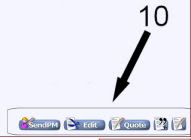
Send PM: A quick button for sending a user a PM (private message). They are located on each users posts.
Edit: You may use this button to edit a post you have made.
Quote: Use this button if you would like to quote a post made by someone else. When you do this the post you are quoting will appear in your post as well.
Multi-quote: Use this button to quote multiple posts. Click the button for each post you want to quote.
Quick Reply to Post: Use this button to post a quick reply in a thread.
11.
The number in the corner of each post represents the number of the post in the thread. If you click the number it allows you to view that single post. It's handy if you'd like to show someone a specific post by copying that link location instead of the entire thread.
-
Thu, Aug 21st, 2008, 05:55 PM #2183Smart Canuck
- Join Date
- Apr 2008
- Location
- CFB Borden
- Age
- 51
- Posts
- 2,872
- Likes Received
- 1
- Trading Score
- 0 (0%)
-
Thu, Aug 21st, 2008, 05:59 PM #2184Canadian Guru
- Join Date
- Jul 2007
- Location
- Beautiful BC
- Posts
- 14,147
- Likes Received
- 11
- Trading Score
- 0 (0%)
TPA, I remember being new here and how confused I too was at first...
wait...
Somedaze, I still am confused
-
Thu, Aug 21st, 2008, 06:04 PM #2185Smart Canuck
- Join Date
- Apr 2008
- Location
- CFB Borden
- Age
- 51
- Posts
- 2,872
- Likes Received
- 1
- Trading Score
- 0 (0%)
-
Thu, Aug 21st, 2008, 06:09 PM #2186Canadian Guru
- Join Date
- Jul 2007
- Location
- Beautiful BC
- Posts
- 14,147
- Likes Received
- 11
- Trading Score
- 0 (0%)
TPA is confused today along with me...
-
Thu, Aug 21st, 2008, 07:02 PM #2187Smart Canuck
- Join Date
- Apr 2008
- Location
- CFB Borden
- Age
- 51
- Posts
- 2,872
- Likes Received
- 1
- Trading Score
- 0 (0%)
-
Thu, Aug 21st, 2008, 07:19 PM #2188Canadian Guru
- Join Date
- Jul 2007
- Location
- Beautiful BC
- Posts
- 14,147
- Likes Received
- 11
- Trading Score
- 0 (0%)
TPA has been changing her avie's today
-
Thu, Aug 21st, 2008, 07:27 PM #2189Smart Canuck
- Join Date
- Apr 2008
- Location
- CFB Borden
- Age
- 51
- Posts
- 2,872
- Likes Received
- 1
- Trading Score
- 0 (0%)
-
Thu, Aug 21st, 2008, 08:21 PM #2190Canadian Guru
- Join Date
- Jul 2007
- Location
- Beautiful BC
- Posts
- 14,147
- Likes Received
- 11
- Trading Score
- 0 (0%)
TPA should know that I am proud of her for going potty all by herself


 Send PM


Thread Information
Users Browsing this Thread
There are currently 4 users browsing this thread. (0 members and 4 guests)

