
User Tag List
Results 1 to 15 of 24
 21Likes
Thread: Need an All-In-One Printer
-
Thu, Jul 25th, 2013, 12:56 PM #1Smart Canuck



- Join Date
- Apr 2012
- Location
- MTL
- Age
- 37
- Posts
- 2,033
- Likes Received
- 2436
- Trading Score
- 85 (100%)


1
So after ten years of loyal service, my HP printer finally cracked down. I'm looking to buy an all-in-one (printer, scanner, photocopier) printer that's preferably wireless as I mainly use my laptop and don't want to have to plug in the usb every time. My max budget is $70 Also, with my HP I paid $21 for a black ink replacement. I'd really want something around that price. I'm purchasing from Amazon with gift cards. I'd really appreciate any feedback.
So far I found a Canon printer, but it's not wireless. It's a PIXMA MG2120 Inkjet photo all-in-one. Do you have any feedback for this one? Thank you!
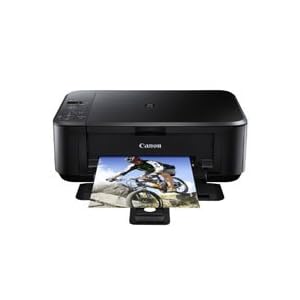
http://www.amazon.ca/Canon-PIXMA-MG2...ywords=printerThis thread is currently associated with: Amazon.ca & Amazon.comComplete quick surveys and cash out at every $20. Receive a cheque, deposit it into your bank. That easy! https://legerweb.com/2Q7V3
-
-
Thu, Jul 25th, 2013, 02:01 PM #2Mastermind


- Join Date
- Oct 2008
- Location
- SK
- Posts
- 118,045
- Likes Received
- 147799
- Trading Score
- 29 (100%)

I love our HP, especially since it gives TONS of prints before needing refill ink - lasts way longer than any printer we have ever had.
The source has this wireless one on for 39, but sale ends today
http://www.thesource.ca/estore/Produ...roduct=8004515
Similar prices at Future shop for several models
http://www.futureshop.ca/Search/Sear...lowSecure=True
The price for one of the above at FS is half the price of what it's selling for on Amazon....
-
Thu, Jul 25th, 2013, 02:28 PM #3Smart Canuck
- Join Date
- Apr 2012
- Location
- MTL
- Age
- 37
- Posts
- 2,033
- Likes Received
- 2436
- Trading Score
- 85 (100%)
Thanks Natalka! I was actually just looking at that model. It's on sale for $65 on Amazon. I just don't have any "real" money right now, lol, so I have to use the gift cards from Amazon. How much does the ink cost to replace it? Thanks again.
Complete quick surveys and cash out at every $20. Receive a cheque, deposit it into your bank. That easy! https://legerweb.com/2Q7V3
-
Thu, Jul 25th, 2013, 06:07 PM #4
If all the ink runs out at the same time you are looking at about $100 to replace all the cartridges. They run between $19 and $25 per cartridge.
-
Thu, Jul 25th, 2013, 07:09 PM #5Mastermind
- Join Date
- Oct 2008
- Location
- SK
- Posts
- 118,045
- Likes Received
- 147799
- Trading Score
- 29 (100%)
I know - I realize you said you wanted to use amazon money, but it's such a good price at the source... Originally Posted by natynat

We don't have that same model, though. We buy the XL cartridges (more than double the usual amount of ink) at Staples, the cheapest around here. I print lots and change black ink maybe twice a year, colour once. I usually print in greyscale, when given the option.
Here's an idea of ink for that model
http://h20386.www2.hp.com/CanadaStor...per&lang=en-CALast edited by Natalka; Thu, Jul 25th, 2013 at 07:15 PM.
-
Thu, Jul 25th, 2013, 07:27 PM #6
I bought a Kodak because the ink is super cheap (around $30 for both colour & black). I got mine through amazon.ca for free and I love it!
-
Fri, Jul 26th, 2013, 09:57 AM #7Smart Canuck


- Join Date
- Mar 2009
- Location
- Bedford, NS
- Age
- 49
- Posts
- 3,216
- Likes Received
- 2426
- Trading Score
- 0 (0%)
I agree....I have an HP3050, and my mom, mom's friend, and landlord all have similar ones. The great thing is they all take the HP61 ink (which Walmart often has on sale 2 for $36). I buy the refilled no-name cartridges filled off eBay for $10 each...for B&W or color. Originally Posted by Natalka
-
Fri, Jul 26th, 2013, 10:00 AM #8Smart Canuck
- Join Date
- Apr 2012
- Location
- MTL
- Age
- 37
- Posts
- 2,033
- Likes Received
- 2436
- Trading Score
- 85 (100%)
Thanks for all the help guys--I really appreciate it
Complete quick surveys and cash out at every $20. Receive a cheque, deposit it into your bank. That easy! https://legerweb.com/2Q7V3
-
Fri, Jul 26th, 2013, 01:00 PM #9Smart Canuck
- Join Date
- Jan 2012
- Location
- Ottawa, ON
- Posts
- 1,561
- Likes Received
- 3088
- Trading Score
- 121 (100%)
One thing to find out before buying if it is a colour printer - If an ink cartridge runs out, does it need to be replaced in order to use the printer? So if the blue cartridge runs out, do you need to replace it even to print in black? My stepdaughter's printer is like that, which was somewhat of a pain for her. Apparently, that is the trend with many of the ink jet printers now.
-
Sat, Jul 27th, 2013, 02:56 PM #10
My only advice would be to do some research before buying an ink all-in-one. Printer industry companies always mention the total ownership cost. Adding $20 upfront for a laser all-in-one may help you save in the long run (provided you don't need to print colour photos). Just my 5 cents...
-
Sat, Jul 27th, 2013, 10:17 PM #11
The reason HP ink costs more is because it has the print head in the cartidge rather than in the machine. However this tends to give the printer longer life.
-
Sun, Jul 28th, 2013, 08:34 PM #12Smart Canuck
- Join Date
- Apr 2012
- Location
- MTL
- Age
- 37
- Posts
- 2,033
- Likes Received
- 2436
- Trading Score
- 85 (100%)
Sorry to sound silly, but what's the difference between laser and inkjet? Originally Posted by printeco1
Complete quick surveys and cash out at every $20. Receive a cheque, deposit it into your bank. That easy! https://legerweb.com/2Q7V3
-
Sun, Jul 28th, 2013, 10:07 PM #13Smart Canuck
- Join Date
- Jan 2012
- Location
- Ottawa, ON
- Posts
- 1,561
- Likes Received
- 3088
- Trading Score
- 121 (100%)
The difference between the ink jet and the laser printer is that an ink jet printer has ink, while the laser has toner (like a photocopier), so the process is different.
Also, because the ink jet cartridges are ink, they often dry up relatively quickly. So sometimes, when your printer is out of ink, it isn't really, it's just that the ink has dried and so the cartridge is useless.
Laser printer toner cartridges don't dry up, so they get used until there is no toner left.
Laser printers are cheaper in the long run, and often even within the first year or two. They are more expensive to purchase than an ink jet printer, but if you buy one that is only black, not colour, it is only a bit more expensive. And although the toner cartridges are more expensive, they print a ton more pages.
The initial lay out of cash is higher with laser printers, however, the per page cost is usually around two thirds less than the per page cost of an ink jet printer.
We purchased a black only laser printer about 27 months ago. It came with a small initial toner cartridge. We use that up and purchased one full cartridge. We are still using that cartridge. And we have a student here. My stepdaughter used that printer for all of her grade 12 and much of her first year of university. And we are still on that one cartridge. With our old ink jet, we would have replaced the cartridges probably 4 to 6 times by now with the amount of printing that has been done.Last edited by super807; Sun, Jul 28th, 2013 at 10:08 PM.
-
Mon, Jul 29th, 2013, 09:32 AM #14Smart Canuck
- Join Date
- Apr 2012
- Location
- MTL
- Age
- 37
- Posts
- 2,033
- Likes Received
- 2436
- Trading Score
- 85 (100%)
Awesome, thank you for the info. I print a lot of papers as well, but occasionally I need colour prints as well
 I will continue my research.
Complete quick surveys and cash out at every $20. Receive a cheque, deposit it into your bank. That easy! https://legerweb.com/2Q7V3
I will continue my research.
Complete quick surveys and cash out at every $20. Receive a cheque, deposit it into your bank. That easy! https://legerweb.com/2Q7V3
-
Mon, Jul 29th, 2013, 06:57 PM #15Smart Canuck

- Join Date
- Jan 2007
- Location
- canada
- Posts
- 4,558
- Likes Received
- 828
- Trading Score
- 2 (100%)
I like the pixma machine, I am on my second pixma, currently using the pixma 250, it's about 5+ years old now and still going strong, it survived graduate school. I think though once my ink is done in this one I am going to upgrade. It is starting to make the squeaky noises when printing and now my house is wireless, so a wireless printer may be nice. I would also like one that can function as a fax machine.
Try out the maven box by julep And code FREEFB, and get your box for one cent:
Use this link
http://www.julep.com/rewardsref/index/refer/id/2287/
 Send PM




Thread Information
Users Browsing this Thread
There are currently 1 users browsing this thread. (0 members and 1 guests)
